


BarTender Printing for NetSuite: How to Eliminate Label Errors
How Does BarTender Printing for NetSuite Eliminate Label Errors Across Your Warehouse?
Labels are rarely the first thing warehouse managers think about when reviewing operational performance. They should be. A label is the first point of data in almost every warehouse transaction. If it is wrong, unreadable or inconsistent, the error does not stay contained. It travels downstream through picking, packing, dispatch and often all the way to the customer.
The cost shows up in returns, credit notes, compliance failures and customer complaints. The original cause is almost always a labelling process that was never properly consolidated.
Why Label Errors Happen
In most warehouses, labelling problems are not caused by careless staff. They are caused by a process that was set up reactively and never centralised. The most common root causes Cloud Coders sees across warehouse environments are:
Decentralised template management. Different printers running different versions of the same template. Staff unsure which version is current. Labels that look slightly different depending on which shift printed them.
Manual data entry at the point of print. Staff pulling information from NetSuite and re-entering it into label software. Every manual step is an opportunity for error. Under pressure, steps get skipped.
No connection to live NetSuite data. Labels printed from static exports or locally saved files that do not reflect current product information, bin locations or order details.
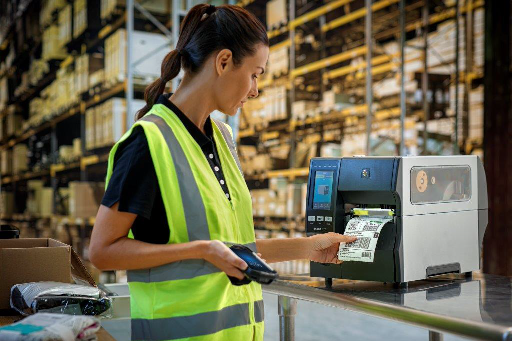
Hardware that is not fit for the environment. Printers that misalign labels under volume. Scanners that cannot reliably read the barcodes being produced. Devices that are not configured for the specific warehouse conditions they operate in.
Each of these is solvable. But solving them individually creates a patchwork that still relies on people getting things right. The only sustainable fix is centralised control.
What Centralised Labelling Looks Like
BarTender Printing for NetSuite is a purpose-built SaaS labelling platform integrated directly with NetSuite via a native SuiteApp. It replaces disconnected, printer-by-printer label management with a single point of control. In practice this means:
Templates are designed, managed and updated in one place. When a template changes, it changes everywhere. No version confusion. No staff printing from an outdated local file.
Live data is pulled directly from NetSuite at the point of print. Product information, bin locations, order details and customer requirements all come from the same system of record your team is already working from. No manual re-entry. No data mismatch.
Smart printing logic is applied automatically. A product with allergens triggers the correct warning label. A hazardous item triggers handling instructions. A pallet going to a specific customer triggers their required format. All without manual intervention.
Print jobs are delivered to the right device, wherever it is, without local printer drivers or on-premise servers. Driverless printing means no IT overhead to manage and no local infrastructure to maintain.
For manufacturers, this means traceability and safety labels printed directly on the production line from live NetSuite data. For logistics teams, it means GS1-compliant pallet and carton labels generated automatically with no manual intervention.
The Downstream Impact of Getting Labelling Right
When labelling is centralised and driven from live NetSuite data, the downstream effects are significant and measurable.
Scan failures drop because labels are produced correctly the first time. Reprints stop being a regular occurrence. Pick errors that originated from misread or inconsistent labels are eliminated. Mis-shipments reduce. Returns reduce with them.
For compliance-sensitive operations, the audit benefit is equally important. Every label is traceable. Every print job is logged. The data on every label matches the data in NetSuite because they are the same data.
Throughput improves not because staff are working faster but because the process no longer has the friction points that slowed it down. Packing runs more smoothly. Dispatch is faster. The operation performs at the level the WMS was designed to deliver.
Hardware That Matches the Environment
BarTender works alongside the hardware it runs on. Choosing the right devices for your environment is as important as the software itself.
Cloud Coders is a Honeywell Silver Partner. We supply and configure printers and scanners that are selected and tested for your specific warehouse environment, including cold storage, high-racking and high-volume fulfilment settings.
We do not recommend devices off a product sheet. We assess the environment, test against your specific barcodes and label requirements, and configure every device to work with your NetSuite setup without middleware.
BarTender pricing aligns to what you print, so you pay for usage rather than a complex licence structure regardless of how much you actually use.
Local Expertise Behind the Implementation
Cloud Coders is an Australian business with over 30 years of warehouse and inventory management experience. As a BarTender Cloud Certified Partner and NetSuite SuiteCloud Development Partner, we bring both the technical capability and the operational knowledge to implement labelling solutions that work in practice, not just in theory.
We configure, test and support every implementation. We are available when questions arise, not just during the project window.
Book a free BarTender walkthrough at cloudcoders.com.au/bartender-printing-for-netsuite/
Frequently Asked Questions
What causes label errors in a NetSuite warehouse environment?
The most common causes are decentralised template management, manual data re-entry at the point of print, labels not connected to live NetSuite data, and hardware that is not fit for the specific warehouse environment. BarTender Printing for NetSuite addresses all of these by centralising template control, pulling live NetSuite data automatically and delivering print jobs without local drivers or servers.
How does BarTender integrate with NetSuite?
BarTender integrates with NetSuite via a native SuiteApp. This means there is no middleware to manage, no external integration to maintain and no data sync to worry about. Label data is pulled directly from NetSuite at the point of print, ensuring every label reflects current system information.
Is BarTender suitable for manufacturers as well as distribution operations?
Yes. For manufacturers, BarTender supports traceability and safety labelling on the production line, with smart print logic that triggers the correct label automatically based on product attributes. For distribution operations, it generates GS1-compliant pallet and carton labels with no manual intervention. The same platform serves both environments.
What hardware does Cloud Coders recommend for BarTender Printing?
Cloud Coders is a Honeywell Silver Partner and supplies printers and scanners configured specifically for each client’s warehouse environment. Device selection is based on an assessment of your layout, volumes, environmental conditions and barcode requirements. Pricing for BarTender aligns to print usage, so there is no complex licensing overhead.
Book a free BarTender walkthrough at cloudcoders.com.au/bartender-printing-for-netsuite/